

Google Campaign URL Builder and the Best UTM Builder Alternatives
Last updated · published

Google’s Campaign URL Builder is a free form that turns a URL plus source, medium and campaign values into one tagged link. It does that job correctly and nothing else: no saved links, no shared value lists, no check that “Facebook” and “facebook” are the same source. Each alternative adds one missing piece: a record (spreadsheets), speed (extensions), short links (shorteners) or enforced rules (governance platforms).
TL;DR
- Google’s Campaign URL Builder is free, needs no sign-in, and builds one correctly encoded link at a time. The GA4 version requires a URL, source and medium. Its help text asks for a campaign name or ID, but it builds the link without either.
- It remembers only the last values typed in your browser. No history, no shared lists, no validation of the values themselves.
- Spreadsheets add a record and shared dropdowns. Extensions add speed. Shorteners add short links and click counts.
- Only a governance platform refuses a wrong value before the link exists.
- Choose by how many people build links and who depends on the reports, not by feature count.
Need one tagged link right now? Use our free UTM builder or Google’s GA4 builder. The rest of this page is for when one link becomes hundreds.
What Google’s Campaign URL Builder Does
Google hosts the builder on its Analytics demos and tools site. Use the GA4 version. The older Campaign URL Builder page is still up, but it was built around Universal Analytics.
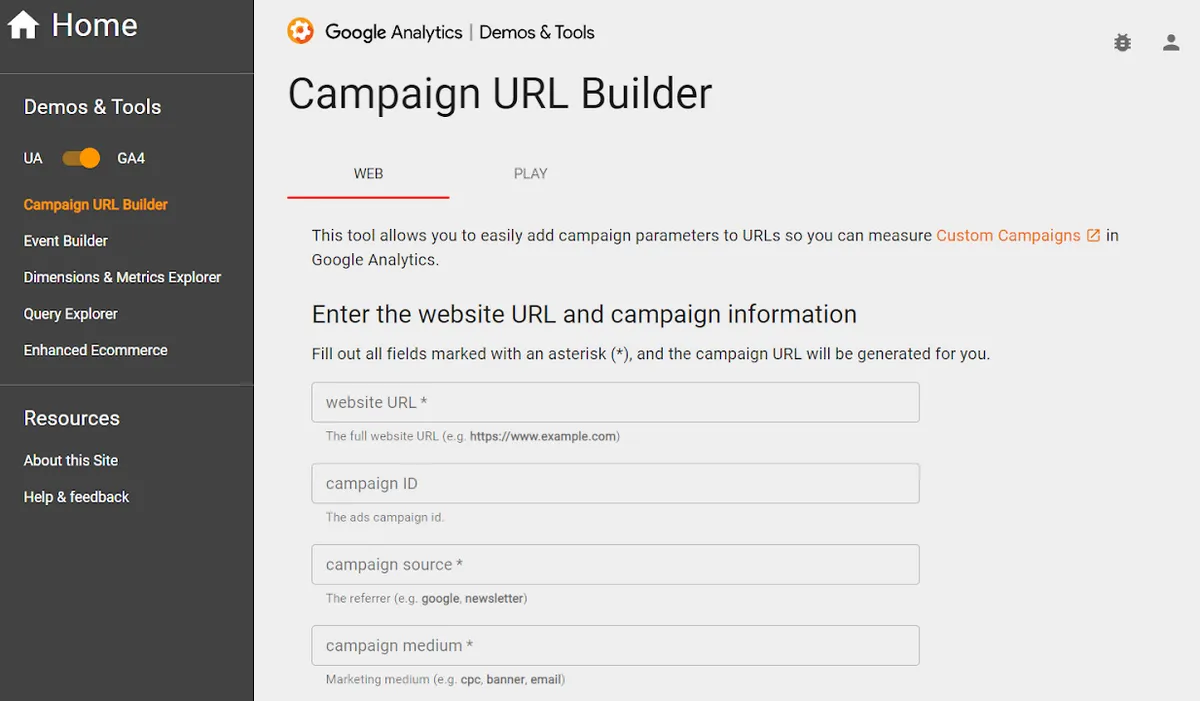
The form is short:
| Field | Parameter | In the GA4 version |
|---|---|---|
| Website URL | (the destination) | Required |
| Campaign ID | utm_id | Optional (help text asks for ID or name) |
| Campaign source | utm_source | Required |
| Campaign medium | utm_medium | Required |
| Campaign name | utm_campaign | Optional (help text asks for ID or name) |
| Campaign term | utm_term | Optional |
| Campaign content | utm_content | Optional |
Fill in the required fields and the tagged URL appears below the form, with a copy button. A Web tab handles site links and a Play tab handles Google Play app campaigns.
A tidy one-off.
What It Gets Right
Give Google credit where it’s earned. The builder handles the fiddly parts of URL construction that people get wrong by hand.
- Encoding. Values are URL-encoded for you, so a space becomes
+and an ampersand in a campaign name can’t break the query string. - Existing tags. Paste a URL that already carries UTM parameters and the builder pulls them into the fields, instead of stacking a second set on the end.
- Sanity warnings. It flags a URL that doesn’t parse, and warns you off tagging a Play Store or iTunes link with the web form.
- A parameter reference. Every field is explained on the page with an example, which is more documentation than most teams write for themselves.
- And it’s free, with no sign-in. Open the page and go.
One myth to retire: Google’s tool does not help Google Analytics recognize your parameters. Analytics reads the parameters on the URL, however they got there. A link typed by hand in a text editor is tracked the same way.
It Builds a Link, Not a Convention
Here’s the gap. The builder checks that your URL is a URL. It never checks that your values are your values.
No memory beyond the last entry. The form keeps the values you last typed in that browser, and that’s all. There’s no list of links you built last month, no record of which campaign name you used for the spring launch, nothing a colleague can see.
No shared lists. Every field is free text. Your team’s agreed medium might be paid_social, but the form accepts paidsocial, Paid Social and social-paid without a murmur.
No validation of values. Google Analytics treats values as case-sensitive, so Facebook and facebook arrive as two different sources. The builder doesn’t lowercase anything or warn you.
One link at a time. Twenty links for a newsletter means twenty trips through the form.
Missing fields. GA4 also accepts utm_source_platform, utm_creative_format and utm_marketing_tactic, though Google says the last two aren’t currently reported. The builder has no input for any of them, so utm_source_platform gets appended by hand, the exact job the tool was meant to take off your plate. More on these in GA4’s extra UTM parameters.
Put those together and you get value drift: one channel reaching your reports under several spellings, each built with a perfectly valid tool.
Illustrative example. Three people tag social links for a quarter. One types facebook, one Facebook, one fb. Every link works. Every click is tracked.
And your source/medium report shows one source as three rows, none of them the real total.
The builder does have a shorten button. It needs a Bitly sign-in and shortens one link at a time, so it doesn’t change the picture.
For a longer look at what free builders cost over time, read the limitations of free UTM builders.
Alternatives, Grouped by What They Add
Most “best UTM builder” lists rank tools on one scale. Wrong frame. The alternatives solve different problems, and the useful question is which gap in Google’s builder is hurting you.
Spreadsheets: A Record and Shared Lists
The first upgrade for most teams, and a good one.
A spreadsheet builder concatenates the URL and parameters with a formula, keeps every row you’ve built, and lives somewhere the whole team can open. Add dropdowns fed from a tab of approved values and you have a basic controlled vocabulary. Wrap values in ENCODEURL in Google Sheets and encoding is handled too.
The weaknesses show up with scale. Dropdowns are easy to get around by pasting. Someone overwrites the formula column. URLs with a # fragment need extra formula work to tag correctly. There’s no click data unless you bolt on a shortener.
The sheet stays correct only as long as its most careless editor is careful.
Start from one of these UTM builder spreadsheet templates rather than building your own.
Browser Extensions: Speed
Extensions put a builder in your toolbar, and many prefill the URL of the page you’re on. The Chrome Web Store lists plenty.
They sit on a spectrum. A minimal one needs no signup and remembers your last-used parameters locally. UTM.io’s extension goes further, with saved templates and team sync.
What an extension adds is fewer clicks. What it rarely adds is governance. If the values in the form are whatever the last person typed, drift just happens faster.
Link Shorteners With UTM Fields: Short Links and Clicks
If your links end up in social posts, SMS or print, a shortener with a UTM builder earns its place. You get a short link, click counts and often QR codes from one form.
Two examples, checked against their pricing pages in September 2026:
- Bitly includes a UTM builder on its paid plans, not the free one. Branded links on a custom domain start on its Growth plan, and click history is capped on the self-serve plans.
- Rebrandly includes a UTM builder on every plan, free included, along with link analytics and 50+ app integrations.
A shortener cares about the short link. It has no opinion on whether utm_medium=Social matches your convention. Our roundup of the best URL shorteners covers the wider field.
Governance Platforms: Rules That Refuse Bad Values
The only category that closes the gap Google’s builder leaves open, because the convention lives inside the tool instead of in a document next to it.
Terminus, the marketing taxonomy governance platform, is one of them. Terminus publishes this article, so weigh this section accordingly.
In Terminus you define a governance model once: fields, picklists (static lists, including hierarchical ones where a parent narrows the child options, and automated lists on the Business plan), taxonomies, and campaign names concatenated from other fields. Validation rules cover case, spaces, uniqueness and patterns. Model changes are drafted, then published, so the team keeps building against the live model while you edit.
Every way in runs the same rules:
- Quick and Form builders for a single link
- the Grid builder for a batch at once
- a CSV round trip
- the API, with the same validation as the forms
A wrong value is refused before the link exists. Short links on your own custom domains (with editable destinations), QR codes, and click analytics grouped by your governed fields all come from the same record. The Business plan adds scoped workspaces and approval workflows.
Try the no-signup playground, start from the template library, or run a 21-day trial with no credit card.
Other platforms in the category include Claravine, CampaignTrackly, Accutics and UTM.io. Our comparison of the best UTM management platforms sets them side by side.
Other Free Single-Link Builders
If all you want is a different form, there are plenty:
- Our free Google URL builder requires source, medium and campaign, and offers a spreadsheet version by email.
- UTMbuilder.net, also run by Terminus, is a free, no-signup builder with the five standard parameters. Nothing typed into it is saved.
- The Facebook Google Analytics URL builder covers source, medium, campaign name, term and content.
They share Google’s limits. A different form is still a form.
Side by Side
| Option | What it adds over Google’s builder | Keeps a history | Shared value lists | Refuses a wrong value | Short links |
|---|---|---|---|---|---|
| Google Campaign URL Builder | (baseline) | No | No | No | Via Bitly sign-in |
| Spreadsheet | Record, formulas, dropdowns | Yes | Yes | Partly; pasting gets around it | No |
| Browser extension | Speed, current-page prefill | Varies | Some | Rarely | Some |
| Link shortener with UTM fields | Short links, clicks, QR codes | Yes | Varies | No | Yes |
| Governance platform | Enforced rules on every way in | Yes | Yes | Yes | Terminus includes them |
Read the “Refuses a wrong value” column twice. It decides whether your reports stay clean, and one row says yes without a qualifier.
Everything else on the table is convenience. Convenience is worth paying for. It just doesn’t fix value drift.
Habits That Apply Whatever You Use
A tool narrows the mistakes. These three habits cover the rest.
Lowercase everything. Google Analytics treats Facebook and facebook as different sources. Pick lowercase and never debate it again.
Never tag internal links. A UTM parameter on a link inside your own site hands the credit for what happens next to your own link, not to the campaign that brought the visitor.
Match your cost data exactly. UTM parameters don’t carry spend. When you import cost data into Google Analytics, it joins to your traffic on source, medium and date, and Google strongly recommends adding campaign ID and campaign name. Every value has to match what your links sent, character for character: Facebook and facebook don’t match. One stray capital letter and the spend still shows up, on a row of its own, with none of the sessions or conversions it paid for.
How to Choose
Branch on who builds links and who reads the reports.
If you tag a handful of links a month and nobody else touches them, Google’s builder is fine. Keep your own list of values and stick to it.
If two to five people tag links, move to a shared spreadsheet with dropdowns now, before drift sets in. It’s free and it gives you a record.
If your links live on social, SMS or print, add a shortener with UTM fields for the short links and click counts.
If several teams or agencies tag links and someone downstream depends on the data, a spreadsheet’s soft validation will let you down. That’s the point where a governance platform earns its subscription.
The tool matters less than the rule it enforces. Pick the cheapest option that enforces yours.
FAQ
Is Google’s Campaign URL Builder free?
Yes. It runs on Google’s Analytics demos and tools site, costs nothing, and needs no sign-in.
Does Google’s Campaign URL Builder save my links?
No. It keeps the last values you typed in that browser, and nothing else. There is no history of the links you built and nothing shared with your team.
Which fields does the GA4 Campaign URL Builder require?
The website URL, campaign source and campaign medium. The help text asks for a campaign name or campaign ID, but the link is generated without either. Term and content are optional.
Does using Google’s builder help Google Analytics read my UTM parameters?
No. Google Analytics reads the parameters on the URL regardless of how they were added. A hand-typed link is tracked the same way as one from Google’s tool.
Can Google’s Campaign URL Builder shorten links?
Only through a Bitly sign-in, one link at a time. For short links with click counts, use a link shortener or a governance platform that includes short links.
Does Google’s builder support utm_source_platform or utm_creative_format?
Not as fields. GA4 accepts utm_source_platform, utm_creative_format and utm_marketing_tactic, but the builder has no inputs for them, so you add them to the URL yourself. Google’s documentation says utm_creative_format and utm_marketing_tactic aren’t currently reported, so utm_source_platform is the one worth adding.
What is the best free alternative to Google’s UTM builder?
For one person, another single-link form such as our free Google URL builder does the same job. For a small team, a shared spreadsheet with dropdowns is the better free step, because it keeps a record and a list of approved values.
When should a team move from a UTM builder to a governance platform?
When more than a few people tag links and someone downstream depends on consistent channel data. At that point value drift stops being an annoyance and becomes a reporting problem.
Every account starts with a 21-day trial, no credit card required.