

UTM Builder Spreadsheet Templates and Formulas
Last updated · published

Twenty minutes from now you can have a UTM builder in Google Sheets that lowercases, encodes and checks every value.
Two routes. Copy one of eight free templates that still open. Or build your own: one formula joining the destination URL to source, medium and campaign, each value wrapped in LOWER, TRIM and ENCODEURL, fed by dropdowns.
Neither survives a team that stops using the sheet.
TL;DR
- Eight free UTM builder spreadsheet templates still open. Two of them were built for Universal Analytics or Google+ and need adapting before use.
- The minimum formula is
=A2&"?utm_source="&B2&"&utm_medium="&C2&"&utm_campaign="&D2. It works, and it shipsSpring Saleand stray ampersands straight into your reports.- Wrap every value in the cleaning wrapper,
ENCODEURL(LOWER(TRIM(...))). UseFINDto detect an existing?, becauseSEARCHtreats?as a wildcard.- Dropdowns from data validation turn free text into a picklist. Protect the list tab or anyone can edit the vocabulary.
- A spreadsheet has no authority over a link once it is copied out. That is where it breaks.
Copy a Template That Still Opens
We opened every template below in September 2026, signed out, to confirm it loads. Make your own copy with File > Make a copy before you change anything.
| Template | By | Best for | Watch out for |
|---|---|---|---|
| UTM Builder | Advance Metrics | Source options that narrow to the medium | Menu actions rely on the sheet’s own scripts |
| UTM Campaign URL Builder | Chameleon Collective | Many custom dimensions | Campaign names contain spaces |
| UTM Tagging Template | Robin Rozhon | A clean, small builder | Lowercases the destination URL too |
| UTM Builder and Shortener Spreadsheet | Whole Whale | Parameter explanations | Sample key swaps source and medium |
| UTM Tagger | Hallam Internet | First-time taggers | Only source, medium and campaign |
| Google Analytics URL Builder Spreadsheet | Joshua Uebergang, Digital Darts | Lowercase-and-hyphen guidance | Sample rows date from 2016 |
| Google Analytics Campaign Tagging Tool | Cardinal Path | Required-field checks | App install tabs are Universal Analytics only |
| Google Analytics Campaign Tagging Tool | Annie Cushing | Column-by-column guidance | Advice from the Google+ era |
One template that used to appear on this page is gone: Verrunt’s Campaign URL Builder now returns a 410.
If you want the structure a convention needs rather than a builder, read our UTM naming convention template next. It is a written spec for a seven-tab workbook you build yourself: picklists, a casing rule, a campaign regex and an audit pivot.
Advance Metrics: UTM Builder
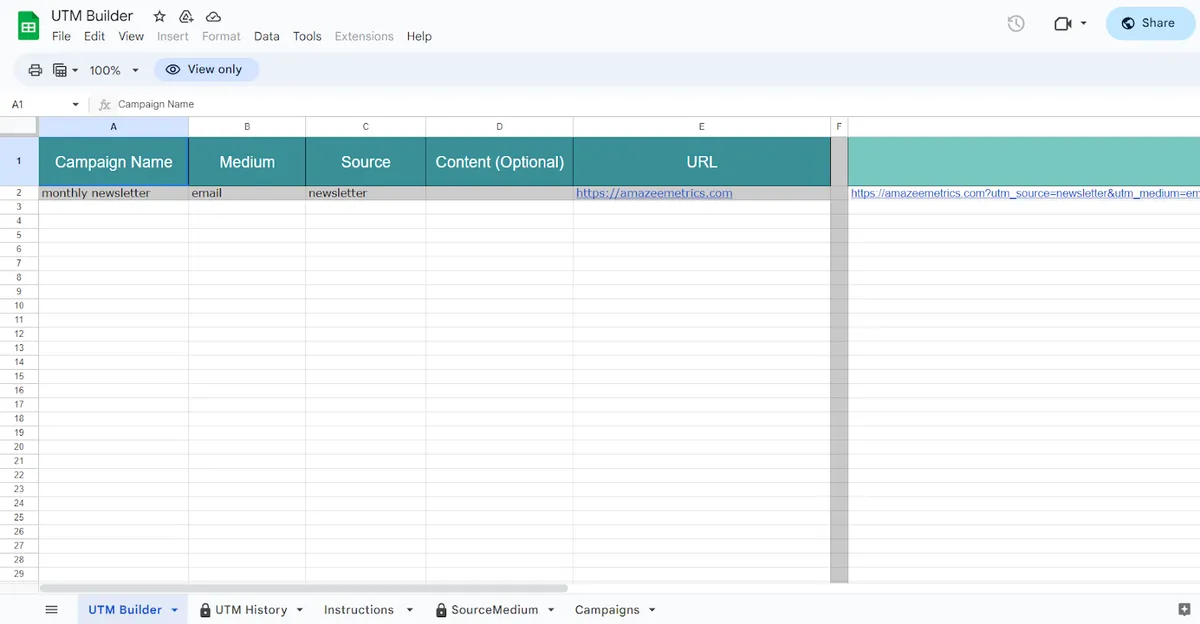
The closest thing here to a governed builder. You pick a campaign, then a medium, and the source dropdown narrows to the sources allowed for that medium. That is a dependent picklist in a free sheet.
It ships with an Instructions tab and a UTM History tab, and a custom menu backs up tagged URLs and adds new campaigns, mediums and sources. Spaces in values arrive encoded as %20.
Chameleon Collective: UTM Campaign URL Builder
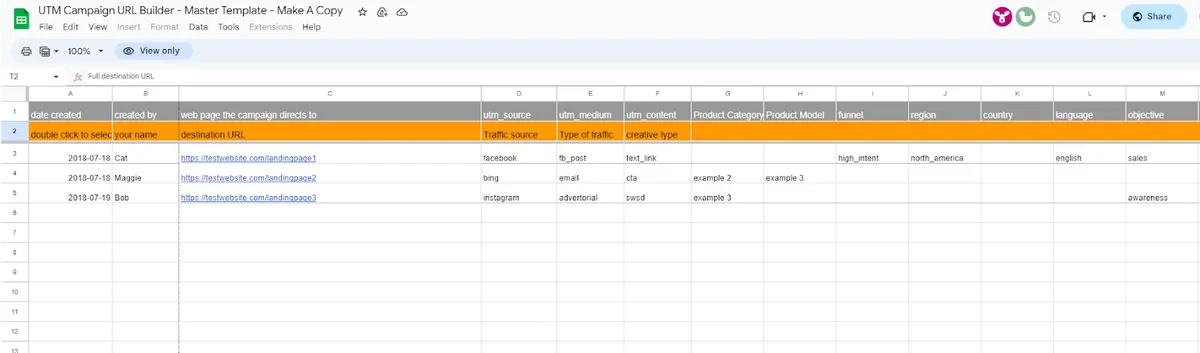
The widest vocabulary of the eight. A Variables tab labeled admin only holds lists for product category, product model, funnel, region, country, language, objective, audience, search terms, promotion and agency, and the builder has columns for who created each row and when.
Two catches. It assembles the campaign name by joining fields with space-hyphen-space, so every campaign value arrives as facebook%20-%20fb_post%20-%20.... Change the separator before you use it. Its content column never reaches utm_content: it is folded into the campaign name.
Robin Rozhon: UTM Tagging Template
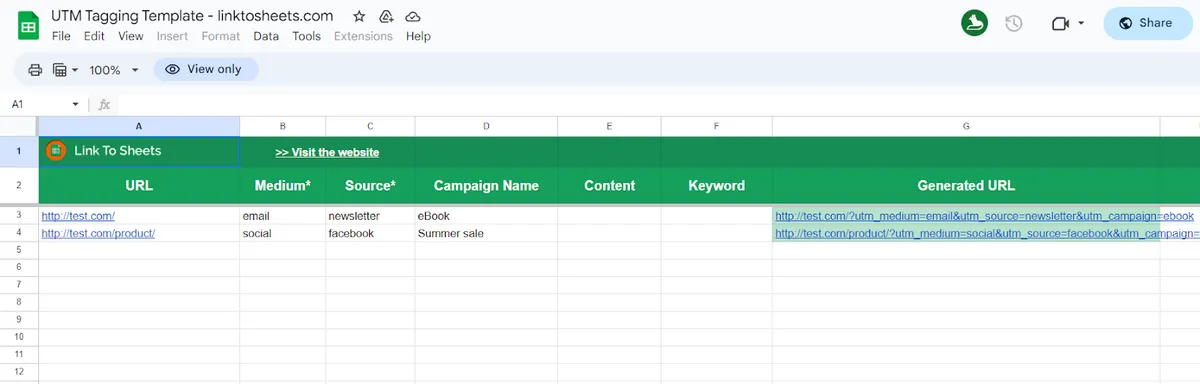
Small and tidy. The generated URL comes out lowercased with spaces encoded, so Summer sale becomes summer%20sale, and it handles destinations that already have a ?. Two catches. The lowercasing covers the whole URL, destination path included, so /Pricing becomes /pricing. And the dropdowns fill from a hidden Settings tab that lists every value already typed, so a typo becomes an option. The sheet is still credited to linktosheets.com, a domain that no longer resolves.
Whole Whale: UTM Builder and Shortener Spreadsheet
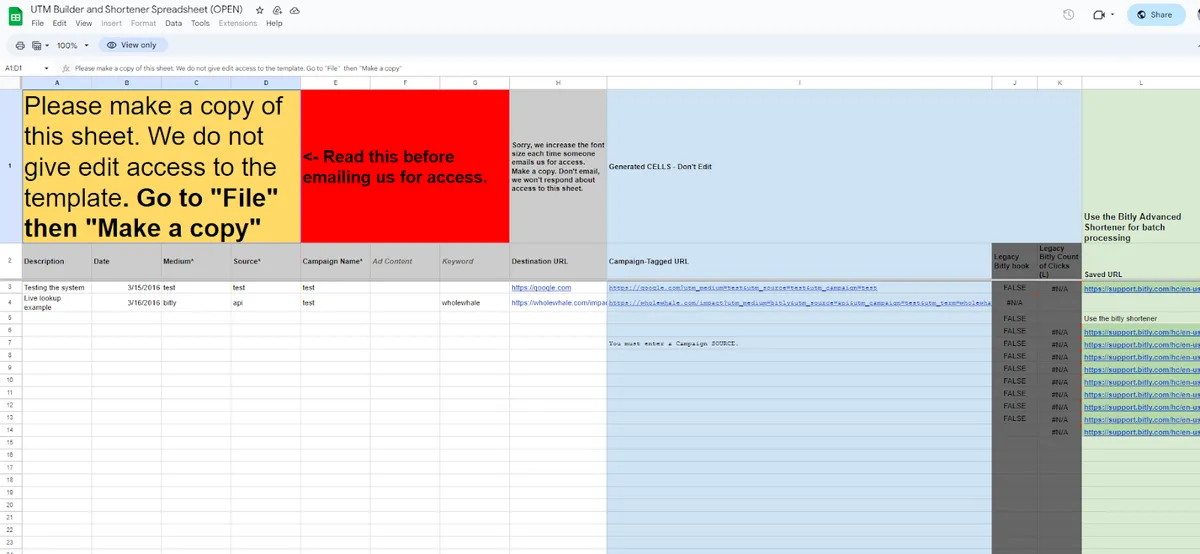
Good for teaching. A KEY tab explains each parameter with examples, and the generated URL column tells you when a source is missing.
Check the sample key before you copy it: it lists email as a source and newsletter as a medium, the reverse of Google’s definitions. For shortening, it points to Bitly’s Google Sheets add-on, and its own Bitly hook is labeled legacy.
Hallam Internet: UTM Tagger
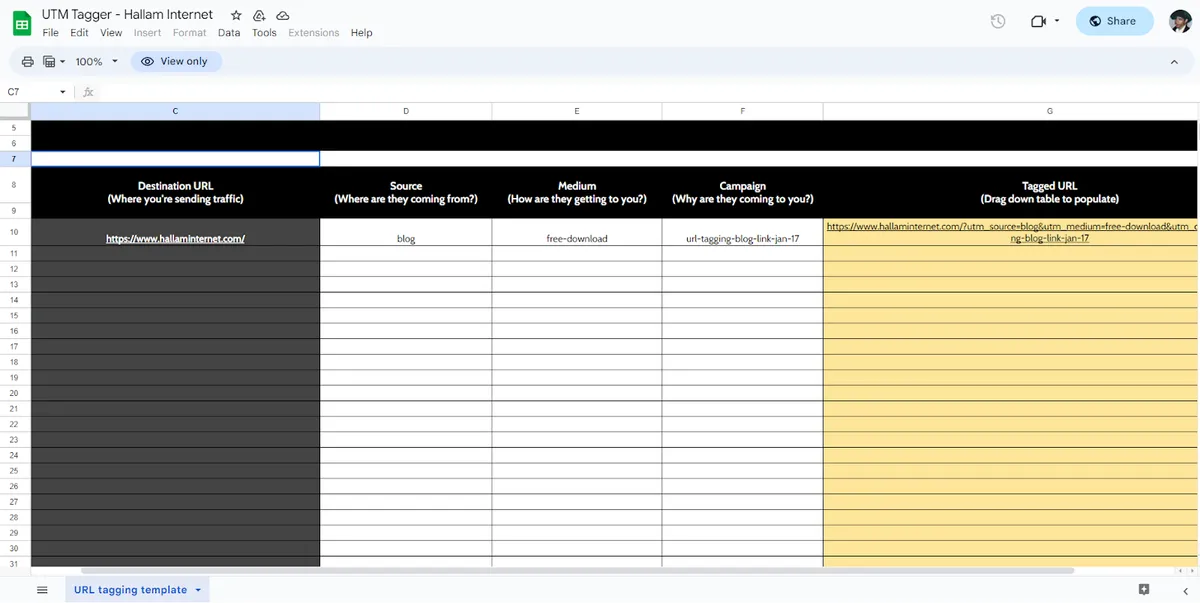
One tab, four inputs, and a plain-English question under each header: where you are sending traffic, where visitors are coming from, how they are getting to you, why they are coming. Hand it to someone tagging their first link. It asks good questions, but it has no list of allowed answers, so it will not stop the second link from drifting.
Digital Darts: Google Analytics URL Builder Spreadsheet
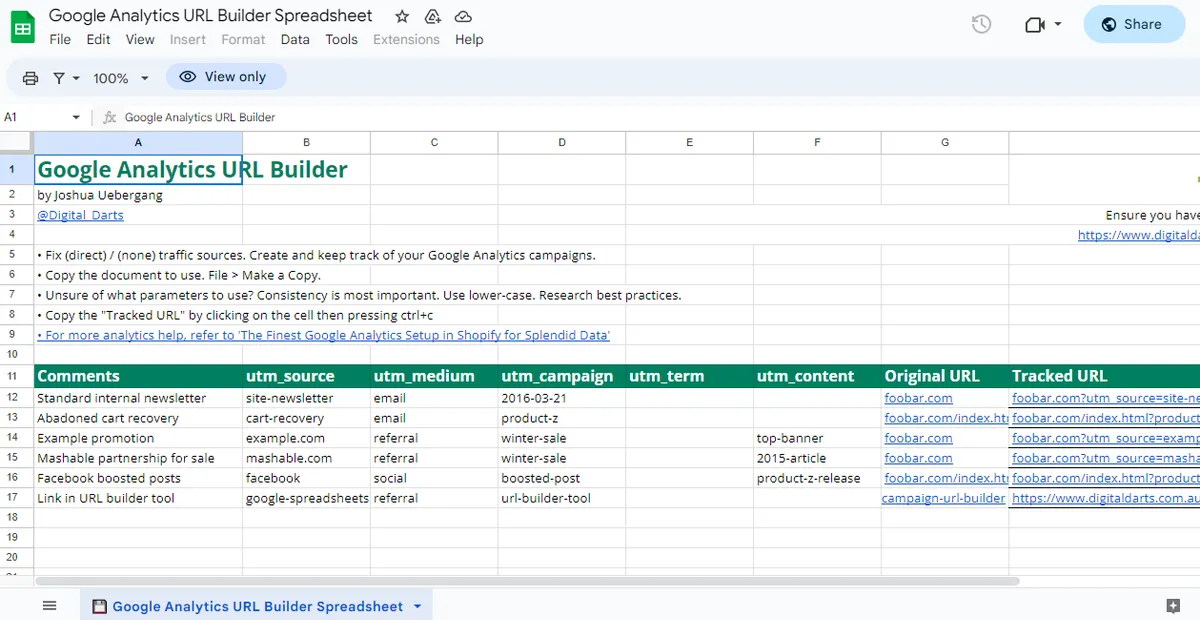
Despite the name, this one comes from Joshua Uebergang of Digital Darts. Its sample rows show it appending parameters correctly to a destination that already has a query string, which plenty of home-built formulas get wrong. It recommends lowercase values with hyphens for spaces.
Cardinal Path: Google Analytics Campaign Tagging Tool
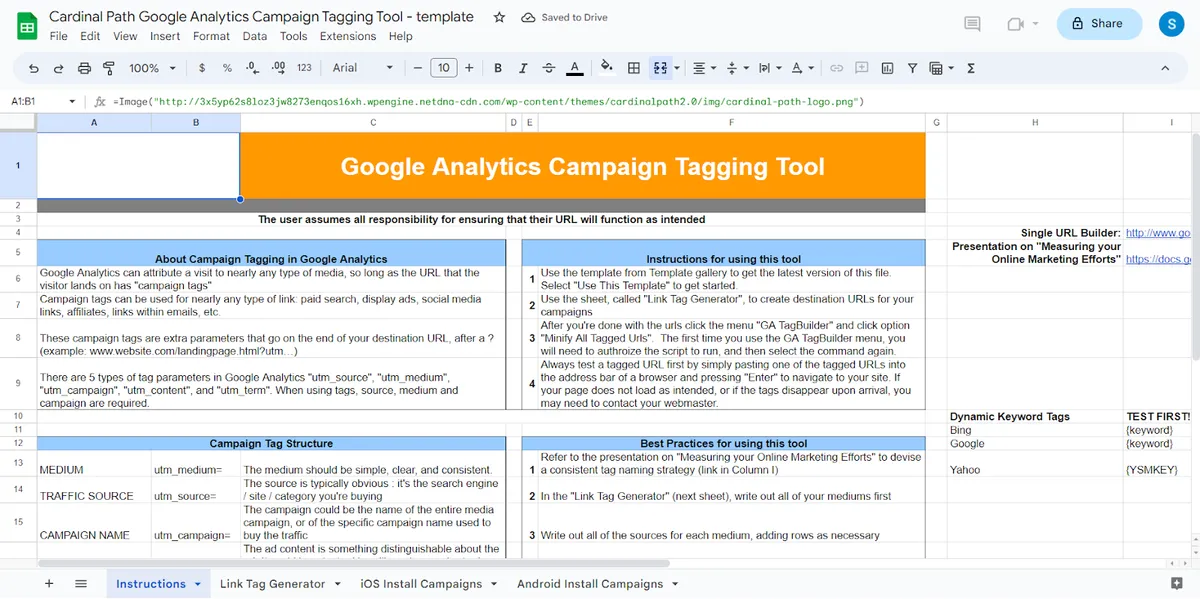
The Link Tag Generator marks destination, campaign, source and medium as required, and the sheet flags rows with *Missing required parameter. The rest shows its age. The iOS install tab builds Universal Analytics redirect URLs with UA property IDs, which GA4 does not use, the Android tab builds an old Play Store referrer format, and the minify menu’s examples are goo.gl links, a shortener Google stopped offering in 2019.
Use the generator tab. Ignore the rest.
Annie Cushing: Google Analytics Campaign Tagging Tool
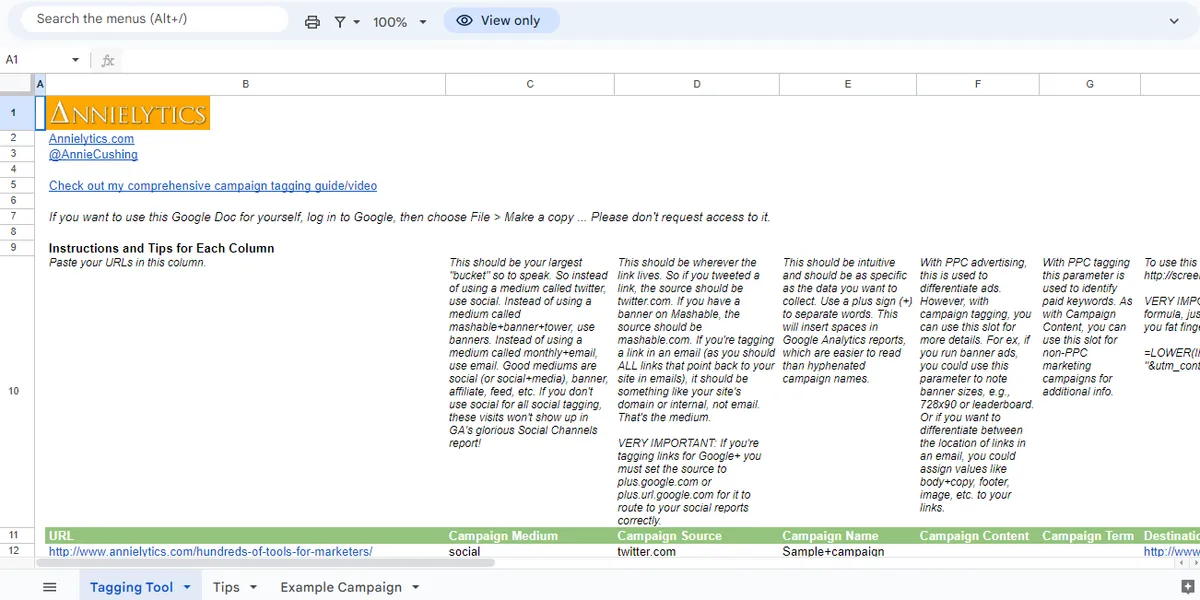
The best written instructions of the eight: a paragraph above every column, a Tips tab recommending dropdowns through data validation, and an example campaign tab. Some of the advice predates GA4, including a note on tagging Google+ links and a suggestion to separate campaign words with plus signs. Keep the thinking, update the specifics.
Build the Formula Yourself
A template is someone else’s convention. If yours differs, build the sheet. Six columns are enough to start, and two of them are optional:
| Column | Holds |
|---|---|
| A | Destination URL |
| B | utm_source |
| C | utm_medium |
| D | utm_campaign |
| E | utm_content (optional) |
| F | utm_term (optional) |
Google says to always use source, medium and campaign, so those three are required here.
Everything below is Google Sheets syntax. Excel for Windows has ENCODEURL and TEXTJOIN, but ENCODEURL does not work in Excel for Mac or on the web, and REGEXMATCH exists only in Sheets.
The simplest formula joins the pieces with the & operator:
=A2&"?utm_source="&B2&"&utm_medium="&C2&"&utm_campaign="&D2CONCATENATE does the same job with commas. The two are interchangeable, so pick whichever your team reads more easily:
=CONCATENATE(A2,"?utm_source=",B2,"&utm_medium=",C2,"&utm_campaign=",D2)Here is what either one produces from a realistic row. The inputs are illustrative:
| A2 | B2 | C2 | D2 |
|---|---|---|---|
https://example.com/pricing | Facebook | Paid-Social | Spring Sale |
https://example.com/pricing?utm_source=Facebook&utm_medium=Paid-Social&utm_campaign=Spring SaleThat link opens. It is also wrong three ways.
GA4 parameter values are case sensitive, so Facebook and facebook become separate rows in your source report. The space in Spring Sale is not valid in a URL, and what happens to it depends on whatever pastes or shortens the link next. And a campaign like Q4 Launch & Webinar gets cut at the ampersand, because & starts the next parameter. GA4 receives Q4 Launch as the campaign.
Plenty of home-built sheets stop at this formula. Don’t.
Clean Every Value on the Way In
Wrap each value in what we call the cleaning wrapper: TRIM strips stray spaces, LOWER fixes case, and ENCODEURL makes whatever is left safe to put in a URL.
=A2&"?utm_source="&ENCODEURL(LOWER(TRIM(B2)))&"&utm_medium="&ENCODEURL(LOWER(TRIM(C2)))&"&utm_campaign="&ENCODEURL(LOWER(TRIM(D2)))Same illustrative row:
https://example.com/pricing?utm_source=facebook&utm_medium=paid-social&utm_campaign=spring%20saleAnd the troublesome campaign, Q4 Launch & Webinar, becomes q4%20launch%20%26%20webinar, which arrives intact.
We tested ENCODEURL in a real sheet to see exactly what it touches:
| Character | ENCODEURL output |
|---|---|
Letters, digits, -, _, . | Unchanged |
| Space | %20 |
& | %26 |
# | %23 |
+ | %2B |
/ | %2F |
? | %3F |
= | %3D |
~ | %7E |
So hyphens and underscores, the separators most conventions use, pass through untouched.
One opinion here. The wrapper is a safety net, not a convention. spring%20sale is a valid value and still a bad one. GA4 shows it as spring sale, and the next person who types it by hand as spring-sale creates a second row. Decide on a separator and apply it before encoding:
=ENCODEURL(SUBSTITUTE(LOWER(TRIM(D2))," ","-"))That turns Spring Sale into spring-sale. If you follow the convention in our marketing taxonomy guide, with underscores inside a part, substitute "_" instead. The substitution only handles spaces, though, so Q4 Launch & Webinar comes out as q4-launch-%26-webinar, with the ampersand encoded rather than removed. Picklists (further down) are the real fix.
Handle Optional Parameters and Existing Query Strings
Two more problems show up by week two.
First, optional parameters. If a row has no content or term, the formula should leave those parameters off instead of shipping &utm_content=.
Second, destinations that already carry a query string. The formulas above always add ?, so a destination of https://example.com/pricing?plan=pro becomes:
https://example.com/pricing?plan=pro?utm_source=linkedin&utm_medium=paid-social&utm_campaign=202610_paid-social_smb_spring-saleTwo question marks. The browser reads everything after the first one as the query, so plan now carries pro?utm_source=linkedin and your source is gone.
This formula handles both:
=A2&IF(ISNUMBER(FIND("?",A2)),"&","?")&"utm_source="&ENCODEURL(LOWER(TRIM(B2)))&"&utm_medium="&ENCODEURL(LOWER(TRIM(C2)))&"&utm_campaign="&ENCODEURL(LOWER(TRIM(D2)))&IF(TRIM(E2)="","","&utm_content="&ENCODEURL(LOWER(TRIM(E2))))&IF(TRIM(F2)="","","&utm_term="&ENCODEURL(LOWER(TRIM(F2))))Illustrative inputs: A2 https://example.com/pricing?plan=pro, B2 linkedin, C2 paid-social, D2 202610_paid-social_smb_spring-sale, E2 empty, F2 b2b saas. Output:
https://example.com/pricing?plan=pro&utm_source=linkedin&utm_medium=paid-social&utm_campaign=202610_paid-social_smb_spring-sale&utm_term=b2b%20saasA trap we hit while testing: use FIND, not SEARCH. SEARCH treats ? as a wildcard that matches any character, so SEARCH("?",A2) returned 1 for every URL in our sheet, with or without a query string. FIND matches the literal character.
One case this formula does not handle is a destination with a # fragment. https://example.com/pricing#faq becomes …#faq?utm_source=…, and GA4 never reads parameters after the #. Strip fragments from column A, or keep them out of destinations you tag. The same goes for a destination that already carries UTMs, which ends up with two utm_source values. Flag them with =IF(REGEXMATCH(A2,"[?&]utm_"),"already tagged","").
Assemble the Campaign Name From Parts
Free-typed campaign names drift faster than any other field. Build them from parts instead, with TEXTJOIN. With a date, channel, audience and offer in columns N to Q:
=LOWER(TEXTJOIN("_",TRUE,N2,O2,P2,Q2))Illustrative inputs 202610, paid-social, smb, Spring-Sale give 202610_paid-social_smb_spring-sale. The TRUE skips empty cells, so a row with no audience gives 202610_paid-social_spring-sale rather than a doubled underscore.
This follows the pattern in our naming convention template: underscores between parts, hyphens inside a part. The reverse, hyphens between parts and underscores inside, is what our marketing taxonomy guide uses, and works just as well. What breaks reporting is mixing the two, so pick one and write it at the top of the sheet.
Turn Free Text Into Picklists With Data Validation
Formulas clean values. They cannot tell facebook from fb. For that you need a controlled list, and data validation is the lightweight version.
- Add a tab called Lists. Put your allowed sources in one column, mediums in the next.
- Select the source column on your builder tab, for example B2:B1000.
- Click Data > Data validation > Add rule.
- Under Criteria, choose Dropdown from a range and point it at your source list, for example
Lists!A2:A50. - Click Done. Entries that are not on the list are rejected by default. Under Advanced options, “Show a warning” allows them instead, which defeats the point.
Repeat for medium, and for any other field with a fixed vocabulary.
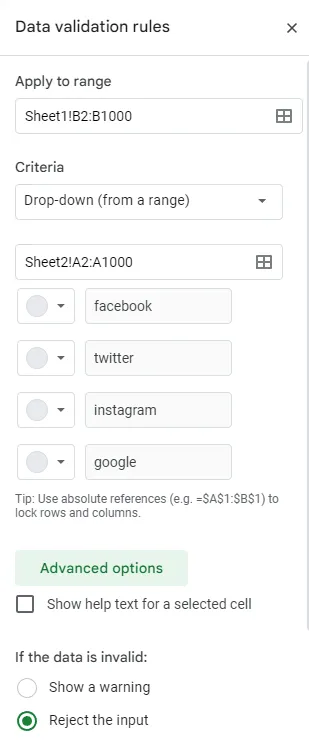
Then lock the list. Anyone who can edit the sheet can edit the Lists tab, which means anyone can add Facebook-Ads and make it valid. Click Data > Protect sheets and ranges, add the Lists tab or range, and choose Restrict who can edit this range. Protect the builder’s input columns’ validation too, or anyone can remove the rule.
For the campaign field, which is generated rather than picked, add a check column that flags anything outside your character set:
=IF(REGEXMATCH(D2,"^[a-z0-9_-]+$"),"ok","check")202610_paid-social_smb_spring-sale returns ok. Spring Sale returns check. For a field you have not given a dropdown yet, this check catches capitals and stray spaces at either end or doubled in the middle:
=IF(EXACT(B2,LOWER(TRIM(B2))),"ok","fix case or spaces")Facebook returns fix case or spaces.
Where the Spreadsheet Breaks
Everything above makes a sheet good. None of it makes the sheet the source of truth.
If you just inherited one, you already know the shape. A tab from someone who left, formulas nobody documented, a Lists tab with forty sources, and a GA4 report that disagrees with all of it. The sheet was fine. People stopped using it.
That is the failure no formula fixes. Someone copies a tagged URL, edits the campaign in a chat message, and ships it. Someone builds links in a second sheet during a launch. An agency never sees the sheet at all. The dropdowns guard the cells, and the links leave through a door the sheet does not control.
Our spreadsheet comparison walks through the four failure modes and the rough thresholds where a sheet starts costing more than it saves.
When you pass them, the work you did here carries over. Your Lists tab is a set of picklists. Your TEXTJOIN column is a concatenated campaign name. Your REGEXMATCH check is a validation pattern. Terminus, the marketing taxonomy governance platform, holds exactly those as a governance model: fields, picklists (including hierarchical ones, where a parent choice narrows the child options), and validation for case, spaces, uniqueness and patterns, published as a revision so the rules do not change under people mid-campaign.
The difference is where the rule runs. No tool stops someone hand-editing a link after it is copied. What changes is that every sanctioned way to build one enforces the same rules, so hand-editing becomes the only way to get a bad value, and never the easiest. Every way of building a link, one at a time, hundreds in a grid, a CSV round trip or the API, goes through the same validation, so a value the model refuses cannot ship from any of them. You can start from a template or try the builder without an account.
Until then, lock the Lists tab. It is the step that keeps every other one honest.
FAQ
Is there a free UTM builder template for Google Sheets?
Yes. Eight still open: Advance Metrics, Chameleon Collective, Robin Rozhon, Whole Whale, Hallam Internet, Digital Darts, Cardinal Path and Annie Cushing. Advance Metrics narrows source options to the medium you picked. Cardinal Path and Annie Cushing need their pre-GA4 advice removed.
What is the Google Sheets formula for a UTM link?
The minimum is =A2&"?utm_source="&B2&"&utm_medium="&C2&"&utm_campaign="&D2, with the destination in A and source, medium and campaign in B to D. Wrap each value in the cleaning wrapper, ENCODEURL(LOWER(TRIM(...))), so case, stray spaces and special characters do not reach your reports.
Should I use CONCATENATE or the & operator?
Either. CONCATENATE(A2,"?utm_source=",B2) and A2&"?utm_source="&B2 produce the same result. In Google Sheets, CONCAT is different: it takes only two values, so it is awkward for a whole URL.
Does ENCODEURL change hyphens and underscores?
No. In our test, letters, digits, hyphens, underscores and periods came through unchanged. Spaces became %20, ampersands %26, hashes %23, plus signs %2B, and tildes %7E.
Why does my UTM formula produce two question marks?
The destination already had a query string and the formula added ? anyway. Check for an existing ? with IF(ISNUMBER(FIND("?",A2)),"&","?"). Use FIND rather than SEARCH, which treats ? as a wildcard and matches every URL.
How do I stop people typing their own UTM values in a spreadsheet?
Data validation with Dropdown from a range, left on the default of rejecting invalid entries. Then protect the list range with Data > Protect sheets and ranges, or anyone who can edit the sheet can add to the vocabulary.
Can Google Sheets build campaign names too?
Yes. =LOWER(TEXTJOIN("_",TRUE,N2,O2,P2,Q2)) joins parts such as date, channel, audience and offer, and skips empty ones. Check the result with REGEXMATCH against your allowed character set.
When should I stop using a spreadsheet for UTMs?
When links regularly get built or edited outside the sheet: a second builder, an agency, or regions working in their own copies. The sheet can only validate its own cells. Past that point you want every sanctioned way of building a link to enforce the same rules, so the governed path is also the easiest one.
Every account starts with a 21-day trial, no credit card required.