

Dash (Hyphen) or Underscore in URLs: Which One to Use
Last updated · published
Use hyphens (dashes) to separate words in URL paths. Google’s URL structure guidelines recommend hyphens instead of underscores, because hyphens help people and search engines see the separate words in a URL.
Underscores still have a place. UTM parameter names such as utm_campaign use them, and GA4 reads only those exact names. For UTM values, the separator you pick matters less than using it the same way every time.
TL;DR
- URL paths: use hyphens.
/how-to-buy-a-car, not/how_to_buy_a_car.- Host names: underscores are not allowed. Hyphens are allowed but optional.
- Query parameter names: UTM names keep their underscores (
utm_source). For parameters you create, such as filters, Google’s example uses hyphens (color-profile).- UTM values: consistency matters most.
spring_saleandspring-salebecome two rows in GA4.- Never put spaces in a URL. Use a hyphen or an underscore instead.
Hyphen, Dash and Underscore: The Terms
In English writing, a dash and a hyphen are different marks. A hyphen joins words (up-to-date). A dash separates parts of a sentence.
In URLs, nobody makes that distinction. “Dash” and “hyphen” both mean the - character. The underscore is the _ character.
Never Use Spaces
A URL cannot contain a raw space. A space gets percent-encoded as %20 (RFC 3986). In form-encoded query strings it becomes a plus sign + (WHATWG URL Standard).
Both forms cause problems. A link with a raw space often breaks when people paste it into an email or a chat. Encoded values are hard to read and hard to search for. Nobody wants to filter a report for spring%20sale.
So replace every space with a hyphen or an underscore.
What Each Character Tells Other Software
Take the phrase “buy now”. You can write it two ways:
- Hyphen:
buy-now - Underscore:
buy_now
Now double-click each one in a browser or text editor.
With buy-now, only the word you clicked is selected. With buy_now, the whole value is selected. This matches the default Unicode word boundary rules, which treat the underscore as part of a word and the hyphen as a break (Unicode Standard Annex #29). Some programs use their own rules, but many behave this way.
That gives each character a clear meaning:
- A hyphen says “these are separate words.” Other software can read
buyandnowseparately. - An underscore says “treat this as one item.” The words inside are for your own use.
Use that meaning to decide, part by part.
The Rule for Each Part of a URL
A URL has several parts, and each has its own answer.
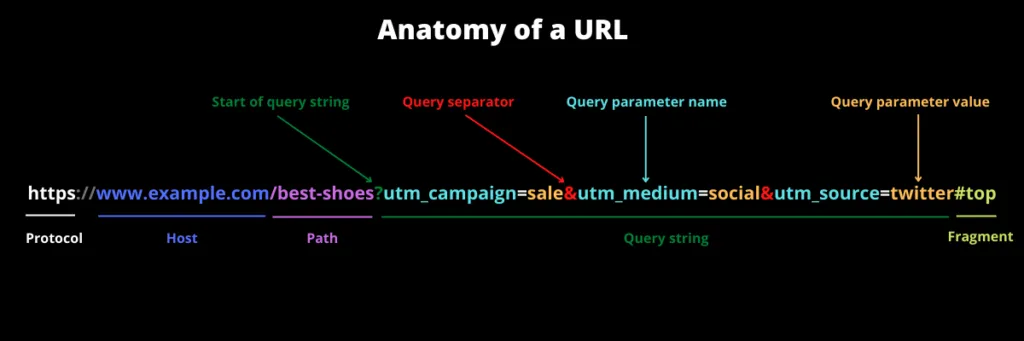
| URL part | Example | Use |
|---|---|---|
| Protocol | https | Not applicable |
| Host | www.terminusapp.com | No underscores. Hyphens only if your brand needs them. |
| Path | /best-shoes | Hyphens |
| Query parameter name | utm_campaign, color-profile | Underscores for UTM names (GA4 requires these exact names). Hyphens for parameters you create. |
| Query parameter value | dark-grey, summer_sale | Hyphens for values that change the page. One consistent convention for UTM values (see below). |
| Fragment | #anatomy-of-url | Hyphens, by convention |
Protocol
http and https are the most common. You don’t choose separators here, so the question does not apply.
Host
The host name rules allow letters, digits and hyphens, but not underscores (RFC 3986, section 3.2.2, which points to the DNS host name rules). A hyphen cannot be the first or last character of a name part.
A hyphen is allowed. Whether to use one is a branding choice. Many brands prefer a domain without hyphens because it is easier to say out loud and remember. For a technical host that visitors never see, such as click-track.example-analytics.com, a hyphen is fine.
Path
The path is the page address, such as /best-shoes or /how-to-buy-a-new-car. This is the part people and search engines read as words.
Use hyphens here. Google’s guidelines say so directly: hyphens help users and search engines identify the concepts in the URL. The same page also says Google treats URLs as case sensitive, so /Best-Shoes and /best-shoes are two different URLs. Lowercase your paths too.
Query parameter names
The query string is the part after ? and before #:
utm_campaign=sale&utm_medium=social&utm_source=twitterEach pair has a name (utm_campaign) and a value (sale).
UTM parameter names are not your choice. GA4 reads a fixed set of names, all with underscores, such as utm_source, utm_medium, utm_campaign, utm_content and utm_term. Type them exactly.
Parameters you create yourself, such as a filter or a sort option, are different. Google’s URL structure guidelines recommend hyphens there too. Their example prefers ?color-profile=dark-grey over ?color_profile=dark_grey, for both the name and the value.
Query parameter values
If a parameter value changes what the page shows, such as a filter or a sort order, follow Google and use hyphens. UTM values do not change the page. Your analytics tool reads them, so they get their own rule.
Fragment
The fragment is the part after #. It always comes at the end of the URL. The browser uses it to jump to a section of the page, like this link to the rule for each part of a URL.
Hyphens are the common choice here. There is no technical rule. It matches the HTML habit of using hyphens in ids and class names.
UTM Values: Use One Rule Every Time
For page paths, use hyphens. UTM values are a different question. Your analytics tool reads them, and it compares them as exact text.
GA4 treats parameter values as case sensitive: utm_source=google and utm_source=Google are different values. A different separator is different text too. If one link says spring_sale and another says spring-sale, GA4 shows two campaign rows. One campaign now shows up as two.
So the real rule is simple. Pick one convention, write it down, and use it on every link.
Here is the convention we use in the Marketing Taxonomy Guide:
- Underscores join words within a segment.
summer_sale,paid_social,brand_awareness. - Hyphens separate one segment from the next.
A structured campaign name then looks like this:
utm_campaign=us-paid_social-facebook-summer_sale-awareness-2025_q2Read it from left to right: region, medium, platform, campaign name, objective, quarter. Each hyphen starts a new segment. Each underscore keeps a multi-word segment together.
This has a practical benefit. You can split the value on hyphens in a spreadsheet or a SQL query, and every segment comes out whole. If you used hyphens everywhere (us-paid-social-facebook-summer-sale), no program could tell where “paid social” ends and “facebook” begins.
For a simple value with no segments, use underscores too: utm_content=buy_now. Then no hyphen ever appears inside a segment, and the rule stays easy to check.
You don’t have to use this exact convention. You do have to use one. For more on building one, see UTM naming conventions.
Check Values Before You Create a Link
A written rule is a good start. It is not enough.
The reliable fix is to check values before a link is created. Terminus, the marketing taxonomy governance platform, does this with validation rules for case, spaces and patterns, so a link built in Terminus cannot carry a value with the wrong separator.
People type values by hand, copy old links, and paste from other teams’ spreadsheets. Mixed separators, mixed case and spaces are common problems in UTM data. The guide’s chapter on common UTM mistakes shows how to find and fix them.
FAQ
Should I use a hyphen or an underscore in a URL?
In the path, use a hyphen. Google recommends hyphens instead of underscores to separate words in URLs. UTM parameter names such as utm_campaign keep their underscores, because GA4 expects those exact names.
Does Google treat an underscore as a word separator?
Google’s documentation does not say how it reads underscores. It recommends hyphens instead, because underscores often mark words that belong together, like the function name format_date in code.
Can a website’s host name contain an underscore?
No. The host name rules allow letters, digits and hyphens only, and public SSL certificates cannot include an underscore. Whether to use hyphens is a branding choice.
Should I rename old URLs that use underscores?
We would not rename a page that already ranks just to change its separators. A new URL needs a redirect from the old address and updated internal links. Use hyphens for all new pages.
Do UTM values need hyphens or underscores?
Either works if you use it consistently. GA4 compares values as exact text, so spring_sale and spring-sale show up as two rows. The convention we use is underscores within a segment and hyphens between segments.
Are URLs case sensitive?
The host name is not. The path and query are: Google treats /APPLE and /apple as different URLs, and GA4 treats Google and google as different source values. Lowercase everything to avoid duplicates.
Every account starts with a 21-day trial, no credit card required.